How to prefill answers in Google Forms?
This is a common question from Google Forms users whose respondents fill in the same details every time. A prefilled form saves them the trouble. Google Forms allows you to pre-populate answers before sharing it with your users and you can use the Pre-fill form option to generate a prefill link. But you have to make that link for each person and everyone can see and change what is in it. With Formfacade, you can hide the prefilled values and send each person their own link by email. Your users will open the form with their details already filled in. Even better, the form will have your own branding instead of Google's, but the responses will be collected on your Google Forms.
Let's start. Open your form in Google Forms and make your prefill link using the steps below. To hide the values or email each person their own link, create your form with Formfacade.
Create a prefill link
- Open your Google Forms
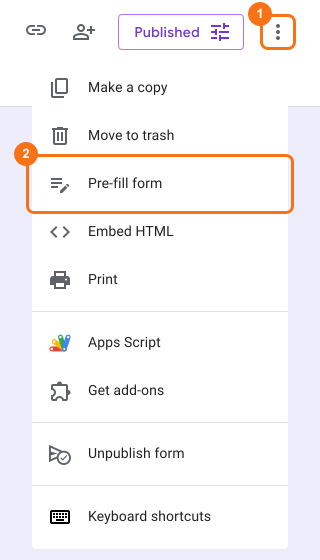
- Click on ⋮ More icon next to the Publish or Published button
- Click on Pre-fill form option
- Google Forms preview will open in a new tab
- Enter answers for the questions to be pre-filled
- Click on the Get link button
- Click on COPY LINK to copy the pre-fill url
Limitations of Google Forms prefill links
- Prefill values are passed via url parameters. This is not ideal if the data includes sensitive information such as patient details in Healthcare, student records in Education & many others
- Prefilled answers can be edited by the users. Google Forms does not have the option to customize the appearance of the fields. Users can easily modify the prefilled values before submitting the form.
- Google Forms does not provide the automation capabilities to generate a personalized url for each respondent and share it with them by email. You have to write formulas in Google Sheets to generate the prefill link and use mail merge tools to send the email.
Summary
Last updated: