How to delete uploaded files in Formfacade?
This is a common question from people whose form collects resumes or other private documents. You may need to remove them once you are done. In Google Forms the uploaded files stay in your Google Drive and deleting a response does not delete its files, so you have to find each file and delete it by hand. With Formfacade, you can permanently delete the uploaded files using the Move to Trash option for the responses in the RESPONSES tab. The response and its files go together, so there is nothing left to hunt for. Even better, the files stay out of your Drive unless you choose to copy them there.
Let's start. Create your form and follow the steps below.
How to add a response with a file?
- On the page that opens, name your form, click Create form and click Proceed.
- Once you create the form, you will land on the form's "Edit" tab. If it asks "Do you want to preview this form?", click No.
- Click on "Share" tab

- Click Copy and open the link
- Fill the form, click Add file and add your file. Click Done and click Submit.
How to delete the uploaded files?
- Click on "Responses" tab

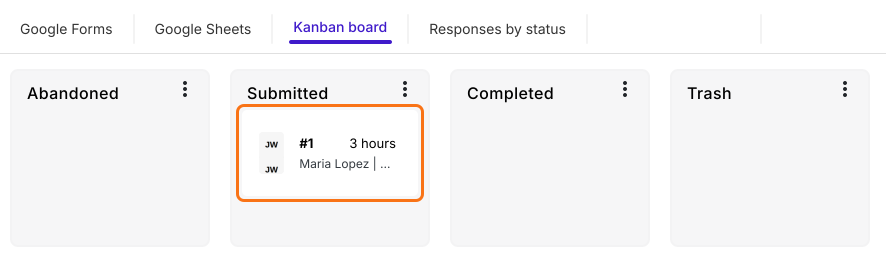
- Select Kanban board > Click on the response in Submitted to view the details.
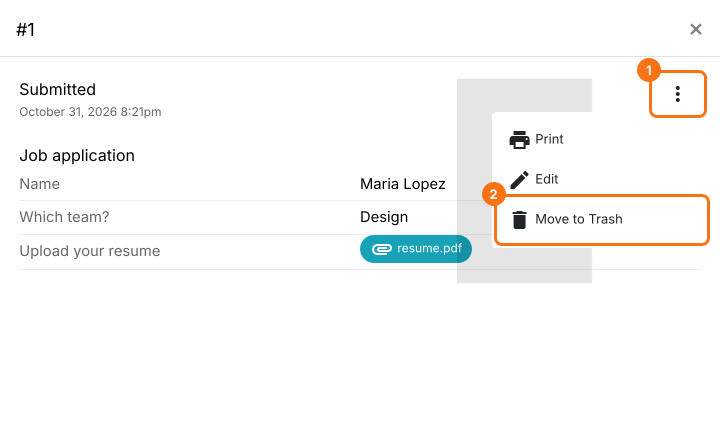
- Form responses including link to uploaded files will be displayed. Click on the ⋮ icon and click on Move to Trash.
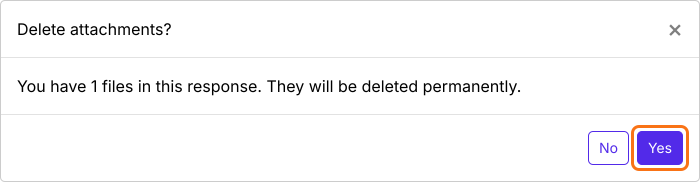
- Delete attachments? confirmation popup will be displayed. Click on the Yes button to permanently delete the uploaded files.
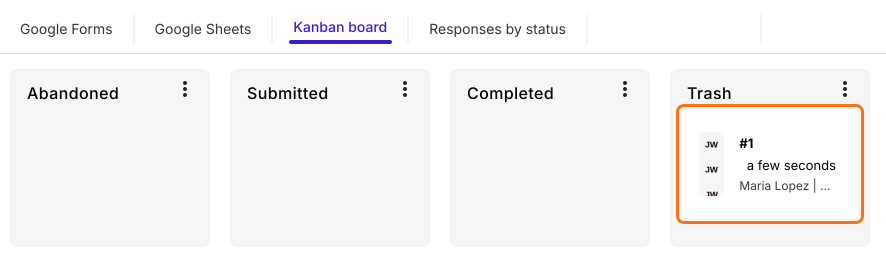
The response will be moved to Trash and the uploaded files will be deleted. Instead of a link to the uploaded file, only the file name will be displayed as a response for that file upload question.
Summary
If you need to remove the files uploaded to your form, you do not have to find them one by one. With Formfacade, you move the response to Trash and select Yes to delete the attachments and the uploaded files are permanently deleted. Create your form and complete the steps above. If you have any questions, write to support.
Last updated: