Multiple choice grid
This is a common question from people who ask the same question about many items. A separate multiple choice question for each one makes the form long, so users get tired and start to skip questions or choose the same answer every time. Google Forms has a multiple choice grid, but options such as shuffling the rows are tucked away in a menu and easy to miss. With Formfacade, you can add a multiple choice grid question in the form's "Edit" tab and your users will see all the items in one table. Even better, you can shuffle the rows, so the last items in your list get the same care as the first.
Let's start. Create your form and follow the steps below.
Multiple choice grid question allows users to select one answer per row. You can customize the question to limit users to select only one answer per column. You can also shuffle the row order to eliminate the order bias and improve the form responses.
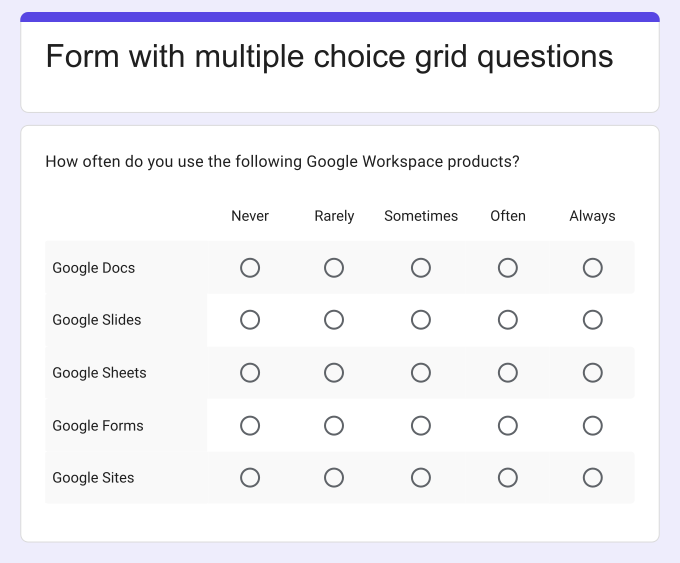
Key features:
- Allows only one answer per row
- Can limit responses to one answer per column
- Can shuffle row order to eliminate order bias
What type of questions can this be used for?
- Frequency scales questions
- Likert rating scale questions
- Ranking grid question
- Voting/poll question
How to add a multiple choice grid question?
- On the page that opens, name your form, click Build form and click Proceed. It can take about a minute.
- You will land on the form's "Preview" tab.
- Click on "Edit" tab

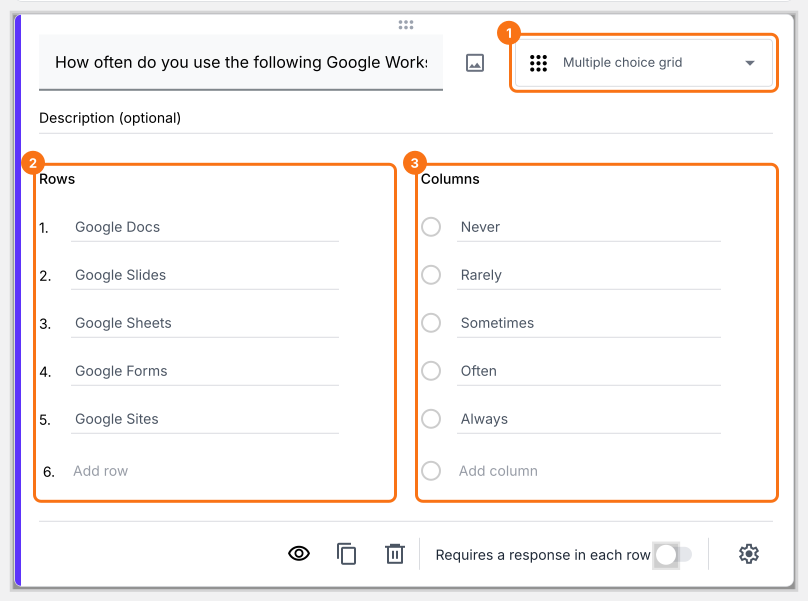
Multiple choice grid question setup looks different from how it is displayed for end users. You have to add your questions as rows and answer choices as columns, but it will be displayed as a multiple choice grid for your users.
- Click on the + icon (Add field) in the toolbar on the right and enter your question
- Select Multiple choice grid in the question type list
- Add questions in Rows and answer choices in Columns
How can I shuffle the order of questions?
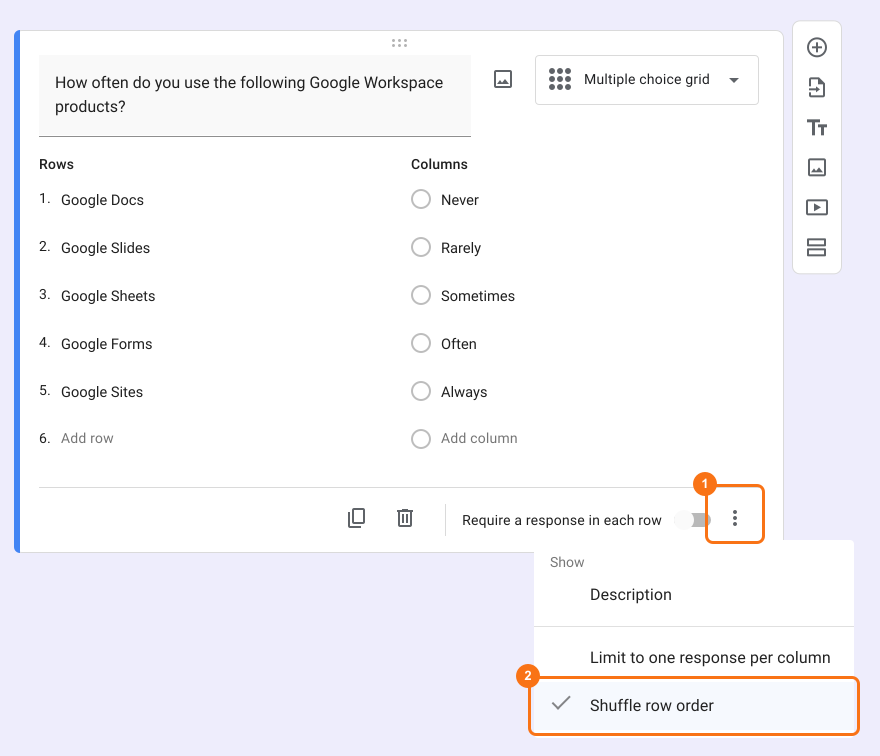
You can shuffle the order of questions to eliminate the order bias and improve the form responses. Once "Shuffle row order" is enabled, the order of questions will be different for each user.
- Click on the + icon (Add field) in the toolbar on the right
- Select Multiple choice grid in the question type list
- Add questions in Rows and answer choices in Columns
- This option is only in Google Forms. Click on the form's title, click on the ⚙️ icon, select the "Advanced" tab and click Launch next to "Edit this form with Google Forms". Google Forms will open in a new tab
- In Google Forms, click on the ⋮ icon on the question and select Shuffle row order
- Open the form's "Edit" tab again, so that your form picks up the change. If you do not see it, wait a few seconds and reload the page.
How can I make users respond to each question or statement in the multiple choice grid question?
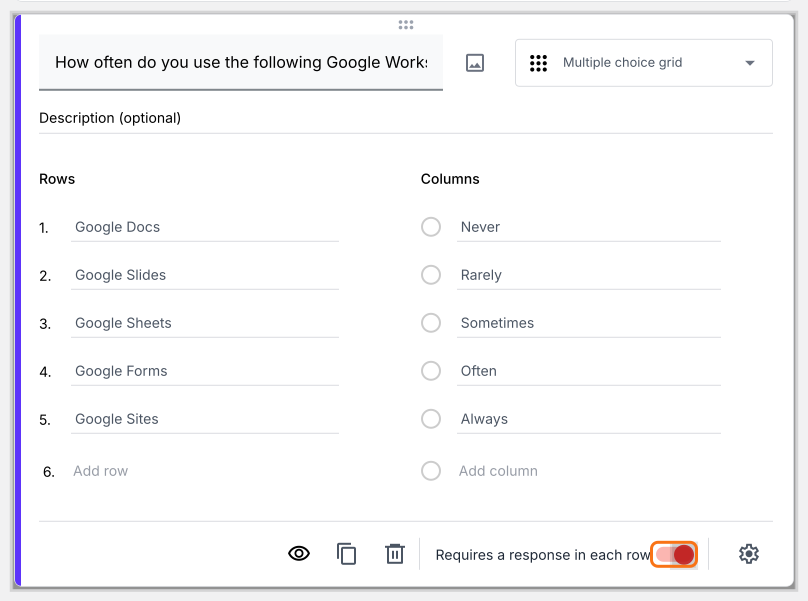
You can force the users to respond to each statement/question in the multiple choice grid question by enabling the Require a response in each row option.
- Click on the + icon (Add field) in the toolbar on the right
- Select Multiple choice grid in the question type list
- Add questions in Rows and answer choices in Columns
- Enable Requires a response in each row toggle button as shown below
How can I limit user responses to one per column?
You can enable the "Limit to one response per column" available in "More" options to limit users to select only one choice per column. You can combine the "Require a response in each row" with "Limit to one response per column" to create a ranking grid question or a voting/poll question.
- Click on the + icon (Add field) in the toolbar on the right
- Select Multiple choice grid in the question type list
- Add questions in Rows and answer choices in Columns
- This option is only in Google Forms. Click on the form's title, click on the ⚙️ icon, select the "Advanced" tab and click Launch next to "Edit this form with Google Forms". Google Forms will open in a new tab
- In Google Forms, click on the ⋮ icon on the question and select Limit to one response per column
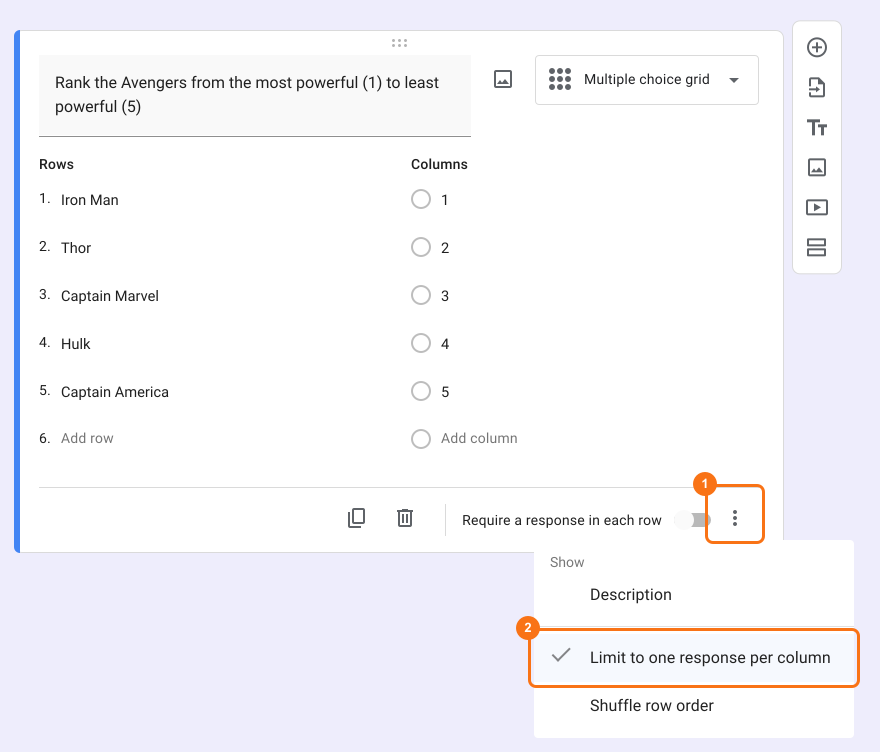
- Open the form's "Edit" tab again, so that your form picks up the change. If you do not see it, wait a few seconds and reload the page.
Summary
If you have many questions with the same answer choices, separate questions will make your form long. With a multiple choice grid in Formfacade, you add questions as rows and answer choices as columns and you can shuffle the rows, require a response in each row or limit responses to one per column. Create your form and complete the steps above.
Last updated: