How to validate if the date entered by the user falls within a date range?
"How to make one of the delivery date not available"- Support forum
This is a common question from people who deliver on certain dates only. If your customers pick a date you cannot deliver on, you have to call them back and change the order. Date questions in Google Forms accept any date and there is no option to limit the range. With Formfacade, a date question has its own validation rules, so you can allow only the dates between two dates and your customers can only pick a day you deliver. Even better, your orders are still collected on your Google Forms, so you can sort them by delivery date in Google Sheets.
Let's start. Create your form and follow the steps below.
Date validation: Specified date range
Let's take a simple example. Deliveries are available from 25th Sep till 1st October. Users can choose their preferred delivery date between these two dates. Since Google Forms does not have the option to add response validations for date questions, we cannot implement this in native Google Forms. Please follow the instructions below to implement this using Formfacade.
- On the page that opens, name your form, click Build form and click Proceed. It can take about a minute.
- You will land on the form's "Preview" tab.
- Click on "Edit" tab

- Click on the + icon (Add field) in the toolbar on the right. A new question will be added.
- Enter "Choose your preferred date" as the question and select Date in the question type list

- Click on the ⚙️ icon at the bottom right of the question
- Field settings screen will be displayed. Select the "Answer" tab.
- Click Configure under Validation
- Select "Allow between two dates"
- Enter the first date and the last date
- Click Save
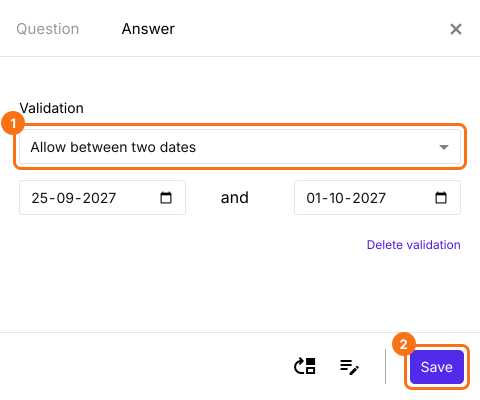
The date box on your form will now allow only the dates between these two dates.
Summary
If your users can only choose dates in a certain range, Google Forms cannot validate it. With Formfacade, you can add the Allow between two dates validation to the date question. Create your form and complete the steps above.
Last updated: