How to show an order summary including the customer details?
This is a common question from small businesses who deliver to their customers. For example, a wrong phone number or address costs you a failed delivery, so they should check those details along with the products before they place the order. A Google Form does not show the answers back to them, so a mistake only comes to light later. With Neartail, you can use the SUMMARY function to show the complete order. Your customers will see the products, the Order Amount and the details they filled in. Even better, your form already has a Review and place order section, so you only change one formula.
Let's start. Create your order form and follow the steps below.
How to show the complete order details filled by the user?
- On the page that opens, click "Enter your form name". Type your form's name, click Generate and wait about a minute.
- Check the outline it suggests and click Proceed.
- Once you create the form, you will land on the form's "Edit" tab. If it asks "Do you want to preview this form?", click No.

- Your form already has a Review and place order section. Click on the section, then click the ⚙️ icon.

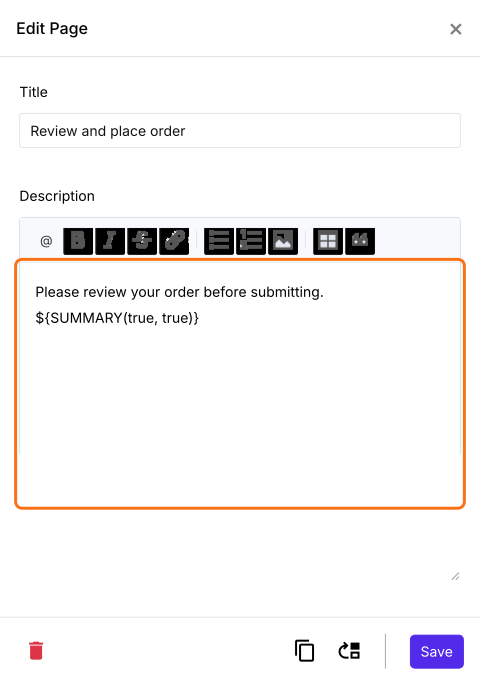
- Edit Page screen will be displayed. The description has the ${BILL()} formula. Replace it with the ${SUMMARY(true, true)} formula as shown below and click Save. This is very useful if you want the users to review their contact and delivery details or if your order form offers customizable products.
Your customers will see the products with their quantities, the Order Amount and the details they filled in before they place the order.
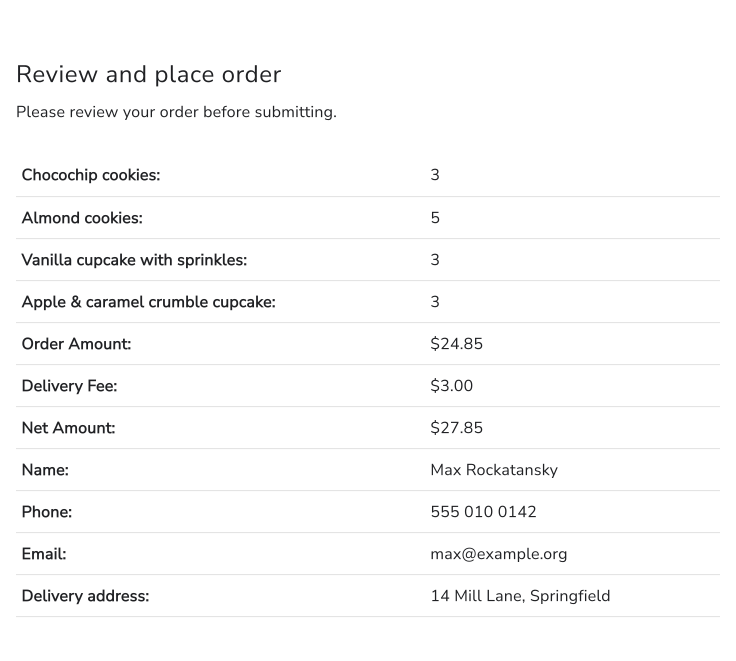
Summary
If a wrong address means a failed delivery, a Google Form cannot show your customers what they filled in. With Neartail, you add the SUMMARY function with true, true to a description and your customers review all their details before they place the order. Create your order form and complete the steps above. If you have any questions, write to support.
Last updated: