How to make the file upload question mandatory?
This is a common question from people who ask for a resume or a document. The form is of no use without it. In Google Forms the file upload question can be marked as required, but it makes everyone sign in to Google. With Formfacade, you can mark the file upload question as required and users have to upload the file before they submit. They will do that with no Google sign in. Even better, the responses will be collected on your Google Forms with a link to each file, so you can sync them to Google Sheets and share them with your team.
Let's start. Create your form and follow the steps below.
How to make the file upload question mandatory?
- On the page that opens, name your form, click Create form and click Proceed.
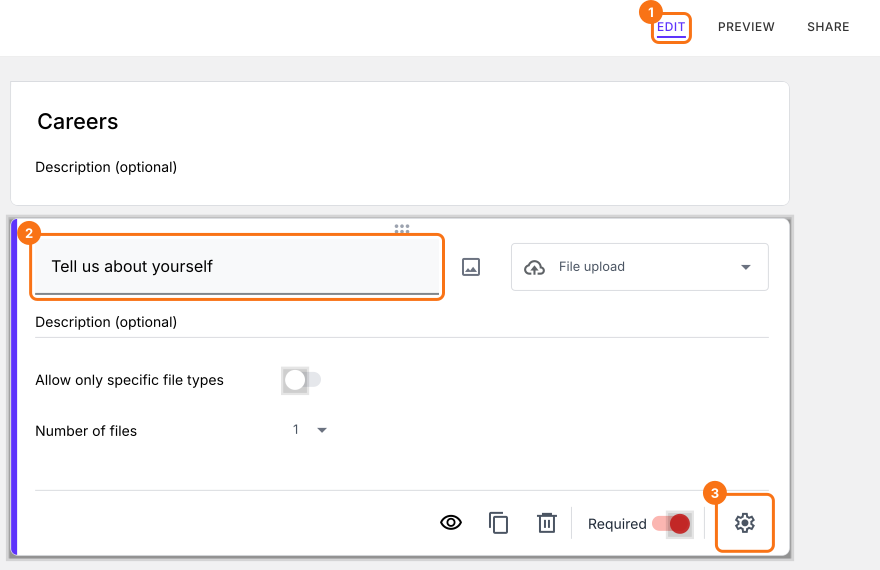
- Once you create the form, you will land on the form's "Edit" tab. If it asks "Do you want to preview this form?", click No.

- In the Edit page, click on the file upload question, then click on the gear icon.
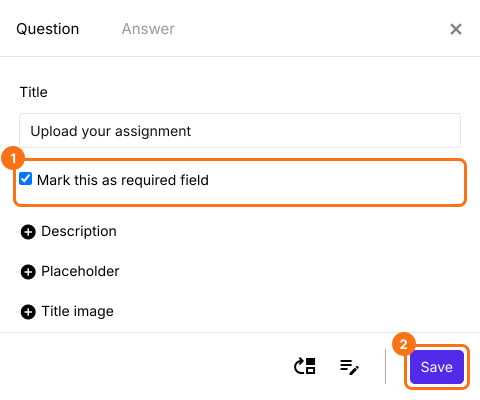
- Field settings screen will be displayed. By default, the question tab will be selected. Check Mark this as required field and click on the Save button.
Users have to upload the file before they submit the form.
Summary
If the file is a must for your form, you need to make the file upload mandatory. With Formfacade, you mark the file upload question as required and users have to upload the file before they submit. Create your form and complete the steps above.
Last updated: