Voting / Top n choices
This is a common question from people who elect office bearers or find the top choices of a group. Each person should give one vote for each role and should not vote for the same candidate twice. Google Forms has no voting question and separate multiple choice questions cannot stop this, so you have to check every response by hand before you count the votes. With Formfacade, you can create it with a multiple choice grid in the form's "Edit" tab and your voters can only pick each candidate once. Even better, you can sync the votes to Google Sheets and count them with your team.
Let's start. Create your form and follow the steps below.
Voting question allows users to rank/vote for their preferred choices from the list of choices. You can add a multiple choice grid question and enable both Require a response in each row & Limit to one response per column option to create a voting question. Here's an example below.
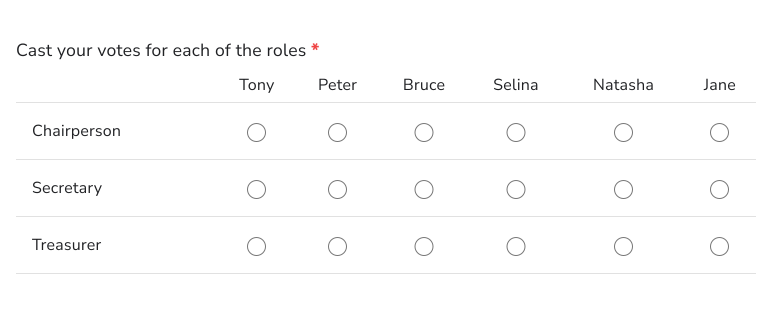
How to create a voting / preferred choices question?
- On the page that opens, name your form, click Build form and click Proceed. It can take about a minute.
- You will land on the form's "Preview" tab.
- Click on "Edit" tab

If you want the users to rank the top three preferred choices from the list of choices or cast their vote to elect different office bearers from the list of candidates, you can use the multiple choice grid question type to create a voting or preferred choices question.
For voting question, add the list of candidates in columns & roles to be voted in rows (example below). For preferred choices question, add the list of available choices in columns and preferred choices (1st, 2nd, 3rd) in rows. This is a variation of a ranking question (rank only top 3 or 5 out of 10).
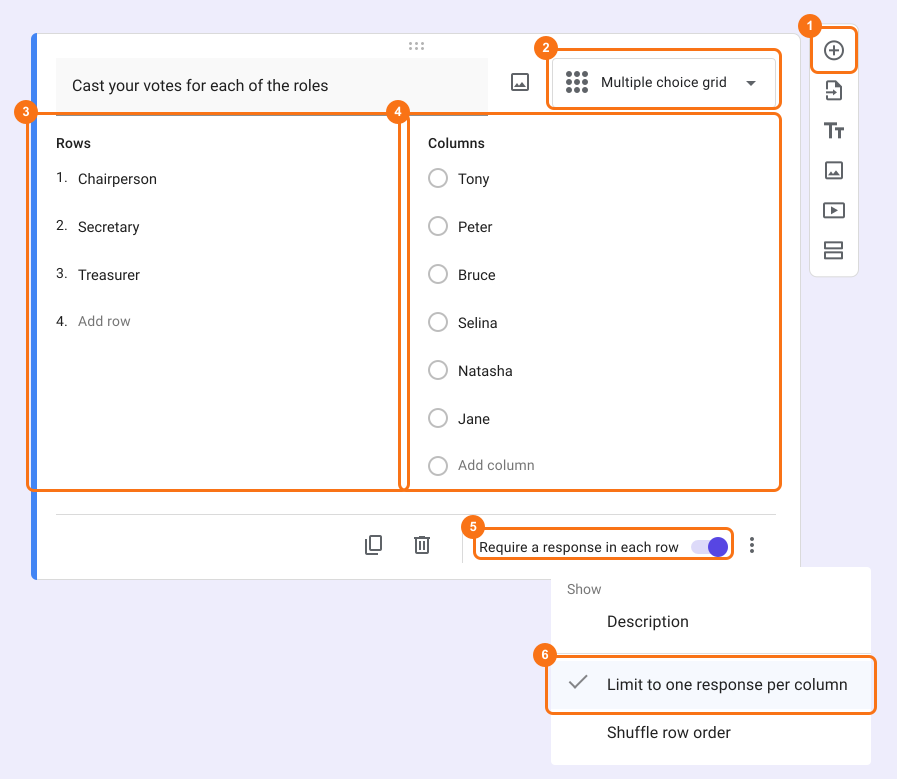
- Click on the + icon (Add field) in the toolbar on the right and enter your question
- Select Multiple choice grid in the question type list
- Add voting items (profiles) in Rows
- Add choices that your users must choose from in Columns
- Enable Requires a response in each row toggle button
- This option is only in Google Forms. Click on the form's title, click on the ⚙️ icon, select the "Advanced" tab and click Launch next to "Edit this form with Google Forms". Google Forms will open in a new tab
- In Google Forms, click on the ⋮ icon on the question and select Limit to one response per column
- Open the form's "Edit" tab again, so that your form picks up the change. If you do not see it, wait a few seconds and reload the page.
Summary
If you run a vote in a form, separate questions will let users choose the same candidate for every role. With a multiple choice grid in Formfacade, you add roles as rows and candidates as columns, enable Requires a response in each row and then Limit to one response per column in Google Forms. Create your form and complete the steps above.
Last updated: