How to share the form to collect responses?
This is a common question from people who collect payments with a form and need one link to send in messages and print on flyers. Google Forms gives you a link and it can shorten it, but that link opens the plain form, which cannot show the amount or ask people to pay. With Neartail, you can use the short link for your form to collect responses from your users. When a user opens it, they see your form with the amount and they are asked to pay when they click Submit. Even better, the page has your own branding instead of Google's, but the responses are collected on your Google Forms.
Let's start. Create your form and follow the steps below.
How to get the short link?
- On the page that opens, click "Enter your form name". Type your form's name, click Generate and wait about a minute.
- Check the outline it suggests and click Proceed.
- Once you create the form, you will land on the form's "Edit" tab.
- If it asks "Do you want to collect payment on form submit?", click Yes. Click on the toggle button next to how you want to be paid under Manual payments, enter your details and click Save. Venmo, Zelle and Cash App are listed only when your form is in USD. To change it, read How to accept Venmo payments.
- If you imported a Google Form, it will not ask. When it says "Your order form is ready", click Preview your form, then Edit form. Scroll down to Payments disabled at the end of the form, click Enable, click Enable again and turn on how you want to be paid in the same way.
- Click on "Share" tab

- Click Link
- Copy the short link and share it with your users to collect responses.
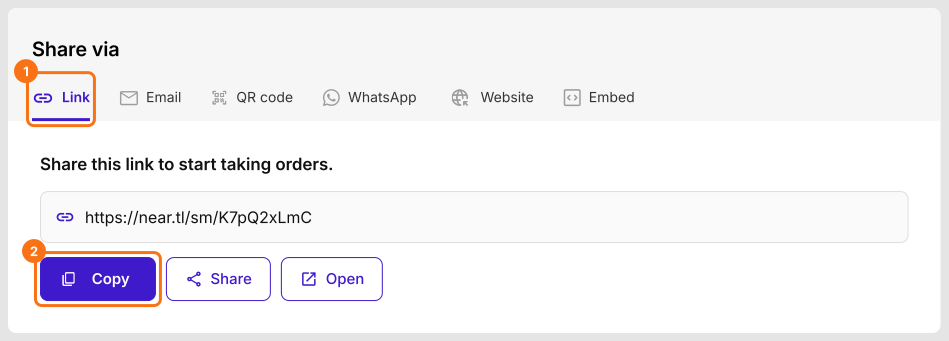
When a user opens this link, they will see your form with the amount and they will be asked to pay when they click Submit.
Summary
If you share the link of the Google Form, your users see the plain form with no payment. With Neartail, you copy the short link and share it with your users to collect responses. Create your form and complete the steps above.
Last updated: