How to set a minimum order amount in your order forms?
This is a common question from small businesses who lose money on small orders. For example, a small order can cost you more to prepare and deliver than it earns, so you want a minimum order amount. A Google Form does not know the total of an order, so it cannot stop an order below your minimum and you have to turn customers away afterwards. With Neartail, you can add a number validation to the Order Amount question to enforce a minimum or maximum order amount. A customer below your minimum sees your message and can add more to their order. Even better, the form adds up the total by itself, so you never check an order against your minimum.
Let's start. Create your order form and follow the steps below.
How to set a minimum order amount?
- On the page that opens, click "Enter your form name". Type your form's name, click Generate and wait about a minute.
- Check the outline it suggests and click Proceed.
- Once you create the form, you will land on the form's "Edit" tab. If it asks "Do you want to preview this form?", click No.

- Your form comes with products, an Order Amount question that adds up by itself and an Order Quantity question. Click on each product and check its name and price, because a generated product can have no name and a price of 0.
To enforce a minimum order amount, add a "greater than or equal to" number validation for the order amount question. Please follow the detailed instructions below.
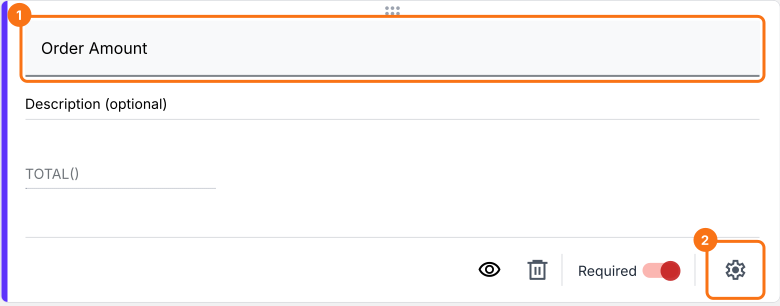
- Click on the Order Amount question, then click the ⚙️ icon
- Field settings screen will be displayed. Select the "Answer" tab. The TOTAL formula is already in the Calculate option
- Click Configure under Validation
- Select "Greater than or equal to" number validation and enter the minimum amount. Enter the error message and click Save
Similarly you can set a maximum order value by adding a "less than" number validation for the Order Amount question.
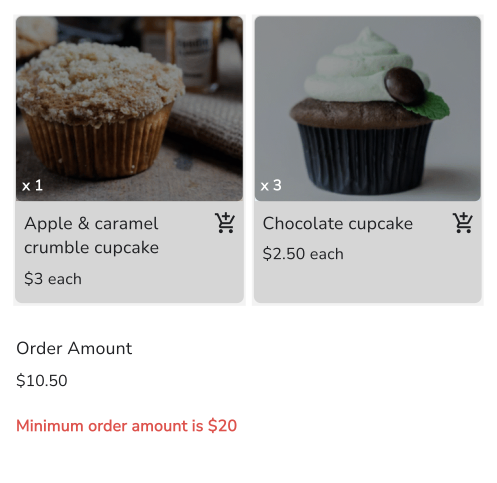
When an order is below your minimum, your customers see your error message on the form.
Summary
If orders below a certain amount do not pay for themselves, a Google Form cannot stop them. With Neartail, the form calculates the total amount with the TOTAL function and the validation you add enforces the minimum. Create your order form and complete the steps above. If you have any questions, write to support.
Last updated: