How to send new order notifications to your team members?
This is a common question from small businesses where other people prepare or deliver the orders. They need to see each new order as well. Google Forms only notifies the people who edit the form and only with a link. So someone has to forward the orders to your staff by hand and orders get missed. With Neartail, you can add your staff members' email addresses in Notify collaborators. They will receive an email with the order details when a customer places an order. Even better, they don't need to edit the form to get it, so the people who only pack orders can't change your menu.
Let's start. Create your order form and follow the steps below.
How to add your staff members?
- On the page that opens, click "Enter your form name". Type your form's name, click Generate and wait about a minute.
- Check the outline it suggests and click Proceed.
- Once you create the form, you will land on the form's "Edit" tab. If it asks "Do you want to preview this form?", click No.

- Click on "Orders" tab

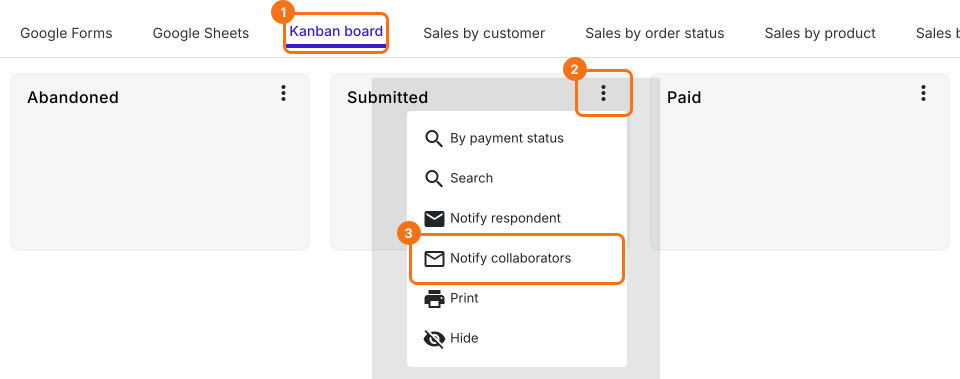
- Click Kanban board, click the ⋮ on Submitted and select Notify collaborators
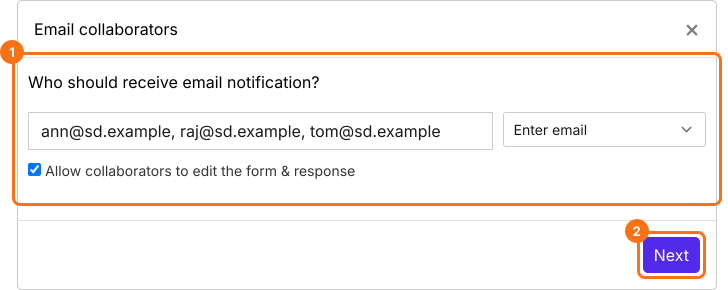
- You can enter a list of email addresses or an email group separated by commas in the Email collaborators step. Allow collaborators to edit the form & response is ticked by default, so untick it if they should only read. Click on the Next button
- Your subject and message are already filled in, so click on the Next button twice
- Click on "Click here", submit a test response and click on the YES button
When a customer places an order, your staff members will receive an email with the order details.
Summary
If your staff prepare the orders, Google Forms does not send them the order details. With Neartail, you add their email addresses and they receive an email with the order details when a customer places an order. Create your order form and complete the steps above.
Last updated: