Publish as PDF

"How to get Google Forms responses in Word or PDF separately?"- Quora
This is a common question from Google Forms users who have to hand out each response on its own. For example, you collect award nominations and your judges need one page for each nominee before the panel meets. Google Forms puts everyone in one spreadsheet and its print option gives you one response at a time or all of them in one long file, so a lot of nominations means an afternoon of printing and sorting. With Formesign, you can automatically generate a custom pdf document when a user submits the form. Even better, you can share each one via email and sync it to your google drive folder, ready for the panel.
Let's start. Upload your form as a PDF and follow the steps below.
Email attachment
- Upload your PDF and click Proceed. On "Do you need the signed document to match your original PDF?", select Yes, keep my PDF exactly as it is and click Continue.
- About a minute later, check the fields and click Proceed. On "How do you want the signature?", select Create a reusable link for recurring forms and click Continue. Your form opens in a new tab so that you can try it. Back on this tab, click View signed documents.
- Each signer starts on Google Sign-in. If your users have no Google account, click Form, click the signature field and click Not required beside Verify identity.
- Click on "Responses" tab

- Click Kanban board
- Click on the three dots for the column your responses land in, such as Submitted, and click Notify respondent
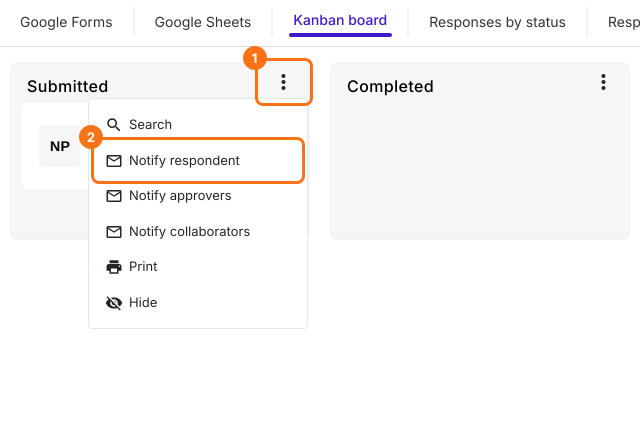
- The Email respondent setup wizard will be displayed. Select the email address field, click Next
- Update the subject, click Next
- Update the message, enable the Include form response as attachment option and click Next
- When Test email notification is displayed, submit a test response with your own email address in the form and click YES to complete the setup.
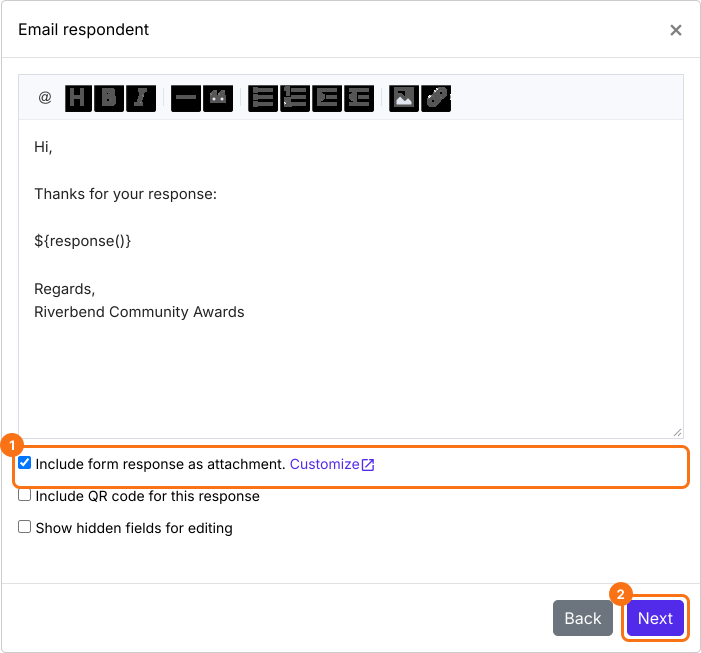
When the user completes the form and submits it, they will receive a confirmation email with the generated PDF document as attachment.
Sync to google drive
- Click on "Signed PDF" tab

- Click Save to Google Drive

- Select the preferred folder, click Next
- Keep Save Entire form response ticked, click Proceed and authorize Google Drive access to complete the setup.
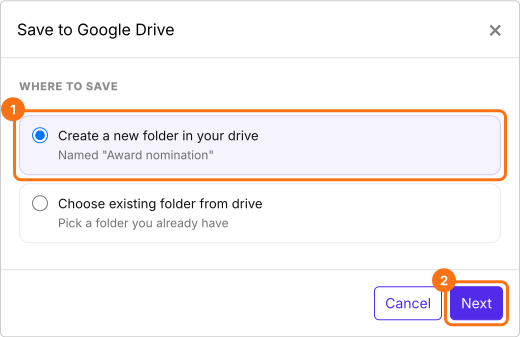
When the user completes the form and submits it, the generated PDF document will be automatically synced to your google drive.
To collect responses, click on "Share" tab, copy the link and share it with your users.
Use Google Docs template
You can also start from your google docs. Click here to learn more.
Summary
If your judges need one page per nominee, one spreadsheet does not help and printing and sorting responses from Google Forms takes an afternoon. With Formesign, each response becomes its own PDF, which you can share via email and sync to your google drive folder. Upload your form as a PDF and complete the steps above. If you have any questions, write to support.
Last updated: