How PDF became the past, present and future of consent forms

PDF feels like a relic from the paper era, but your stored copy still has to look exactly like what was signed. For example, a patient trying to complete a 4-page PDF on a phone often gives up halfway through. A Google Form is easy to fill on a phone, but it can't give you a copy that looks like your document. With Formesign, your PDF is the template and people fill in a form on any device. Even better, you still get the same PDF. In today's world of constant disruption, let me tell you the story of the humble PDF, which evolved from the printing press to the AI era, to become a standard that survived the tsunami of disruption.
To see it, create your form from your PDF.
When I started building Formesign, I had the typical technologist's bias: PDF felt like a relic from the past: a clunky holdover from the paper era that we should have moved beyond. Why were we still using a format designed in 1993 for printing documents? Surely there was something better: a modern, cloud-native, mobile-first format that would make PDFs obsolete.
I was wrong. Not because PDF is perfect, but because I misunderstood how standards work. Standards don't emerge from technology conferences or corporate strategy decks. They evolve from people's behavior over time. The story of PDF is one such evolution across three distinct eras: printing, filling and templating.
The Past: Printing PDFs
Before everything became digital, organizations used design and typesetting tools such as Adobe PageMaker, QuarkXPress or later Microsoft Word to create consent forms. They didn't print directly from those tools. They first converted them to PDF, then printed.
Why? Because PDF solved a practical problem: it packaged fonts, layouts and graphics in a standard format so any printer could render the document exactly as intended, regardless of software or system. PDF guaranteed that every printed copy looked identical. This is critical when the document layout had legal significance.
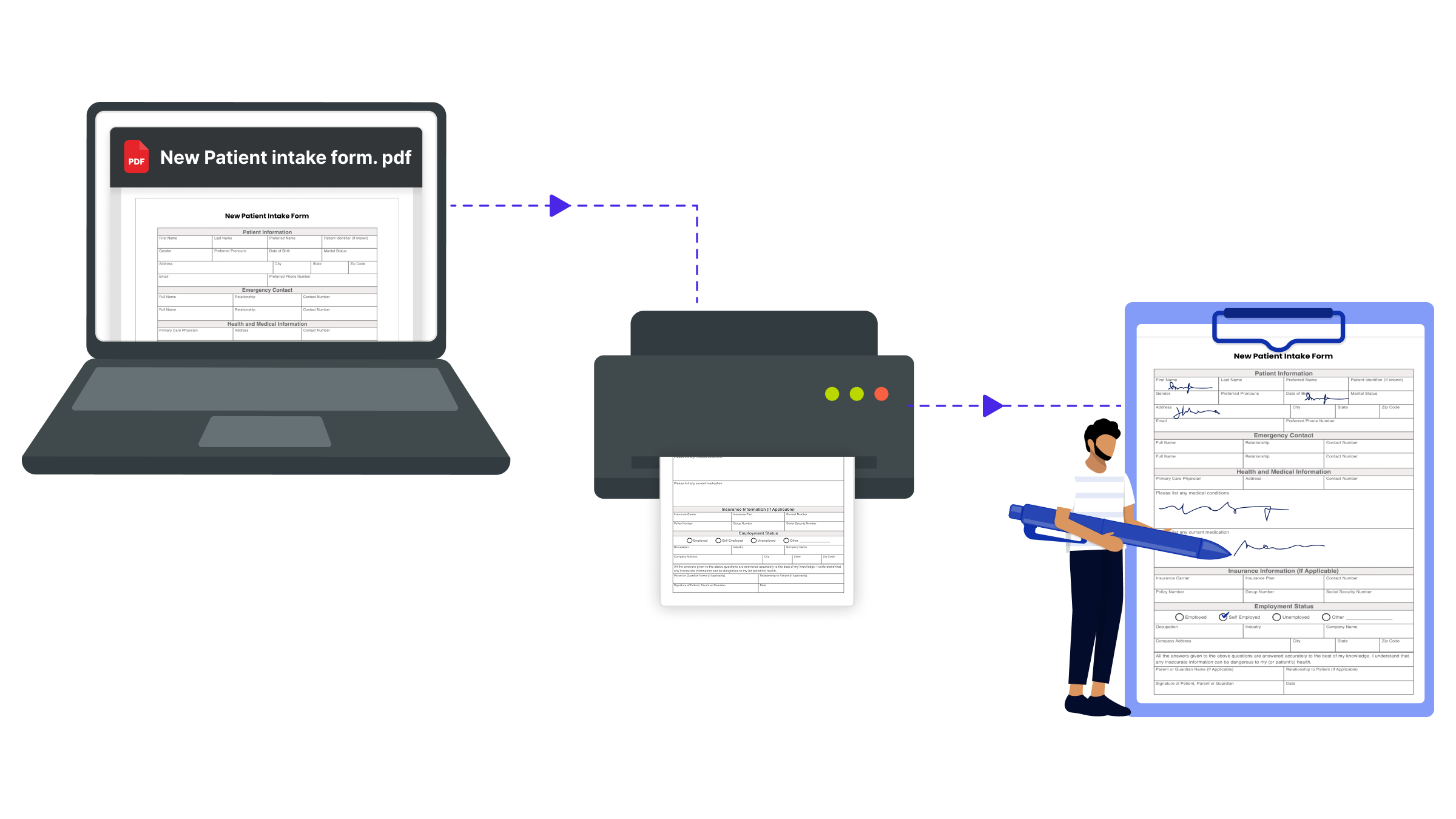
The workflow was straightforward:
- Design the form in Word, InDesign or another layout tool
- Convert to PDF (the master template)
- Print copies as needed
- Patients or clients fill by hand
- File the paper forms or scan them back to PDF for storage
PDF became both the source of truth for appearance and the final format for archiving. It set enduring expectations: consent forms must look canonical, stored copies must match what was signed and the format must remain readable decades later.
The Present: Fillable PDFs
The transition to digital signatures didn't abandon PDF. Instead, platforms like DocuSign allowed organizations to upload existing PDFs and make them fillable by overlaying signature boxes at specific coordinates. Adobe Sign, PandaDoc and even Google Docs followed suit.
This marked the era of skeuomorphic design, where the digital tools mimicked their paper counterparts. The PDF you saw on screen looked exactly like the one you would store. The approach was intuitive:
- Organizations already had PDFs ready to use
- No redesigns required
- Layouts stayed consistent
- Legal teams could easily verify continuity with existing documents
DocuSign essentially said: "Keep your PDF as it is. We'll just make it signable". It solved big problems: eliminating printing costs, enabling remote signing, creating audit trails and cutting turnaround times from days to hours.
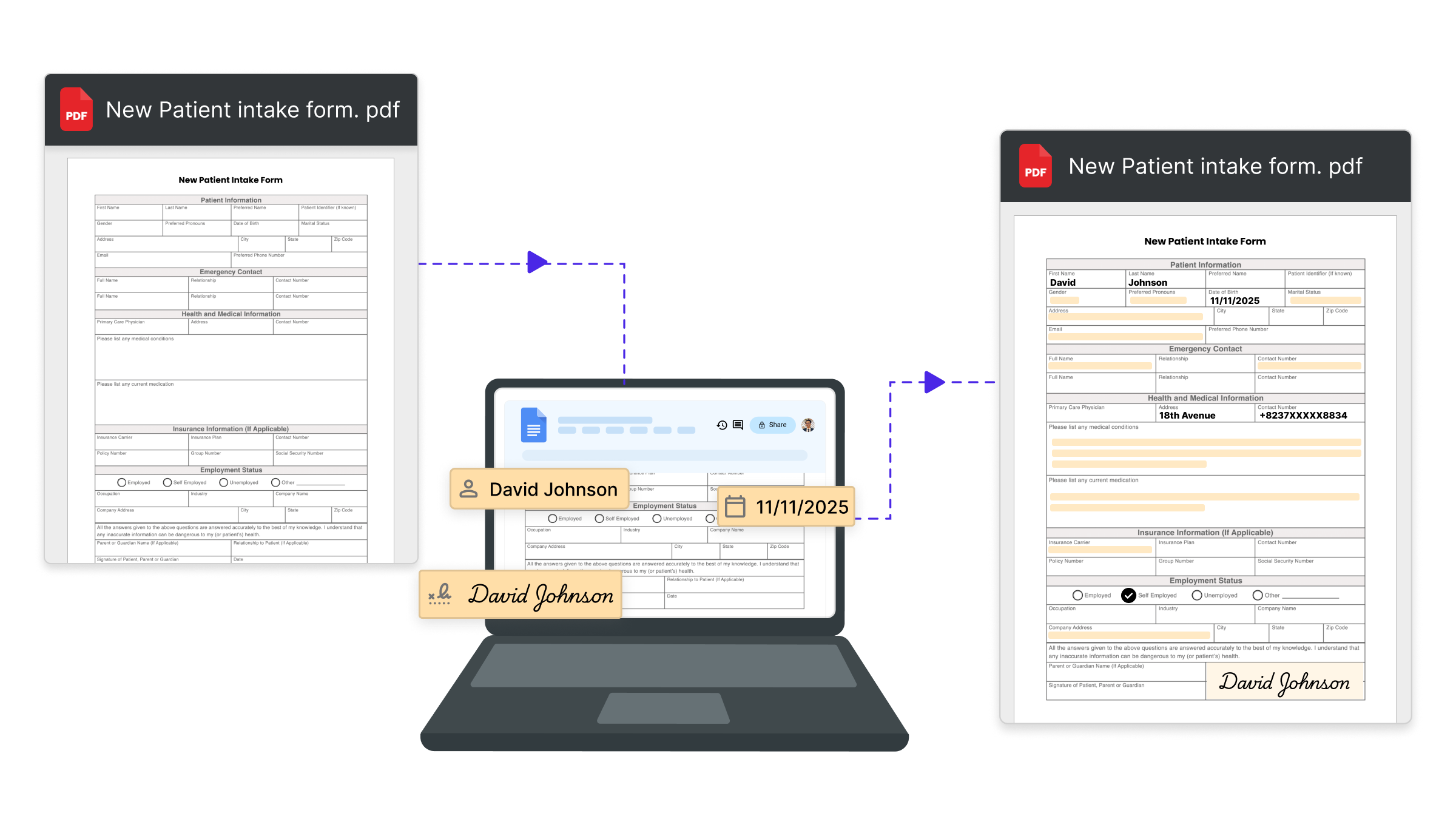
But it also imported the paper paradigm's flaws. PDFs designed for 8.5×11" pages don't fit phone screens. Fixed layouts can't reflow, forcing users to pinch, zoom and scroll endlessly. A patient trying to complete a 4-page intake form on a phone often gives up halfway through.
By 2025, over 60% of web traffic comes from mobile devices, yet most fillable PDFs remain desktop-centric. Abandonment rates rose, submissions declined and frustration grew. The next question became clear: Can we improve the experience while keeping PDF as the final format?
The Future: PDF as Template
The next evolution is decoupling the user interface from the PDF file format. The new AI based signature tools use PDF as a template, not as a data collection interface:
- The organization uploads a PDF or Google Docs as a template.
- Instead of making it fillable, AI maps its fields to a responsive web form.
- Users fill the web form on any device.
- Upon submission, the system generates a completed PDF based on the original template.
- The stored document looks identical to the original.
This is how Formesign uses PDF today. It analyzes a PDF, extracts fields, builds a matching Google form and upon submission, it generates a signed PDF based on the response submitted in the Google form.
Now compare that patient experience: each field fits the screen, the keyboard adjusts automatically, progress is clear and conditional logic skips irrelevant questions. The patient finishes in two minutes instead of ten and the clinic still receives the same professional PDF.
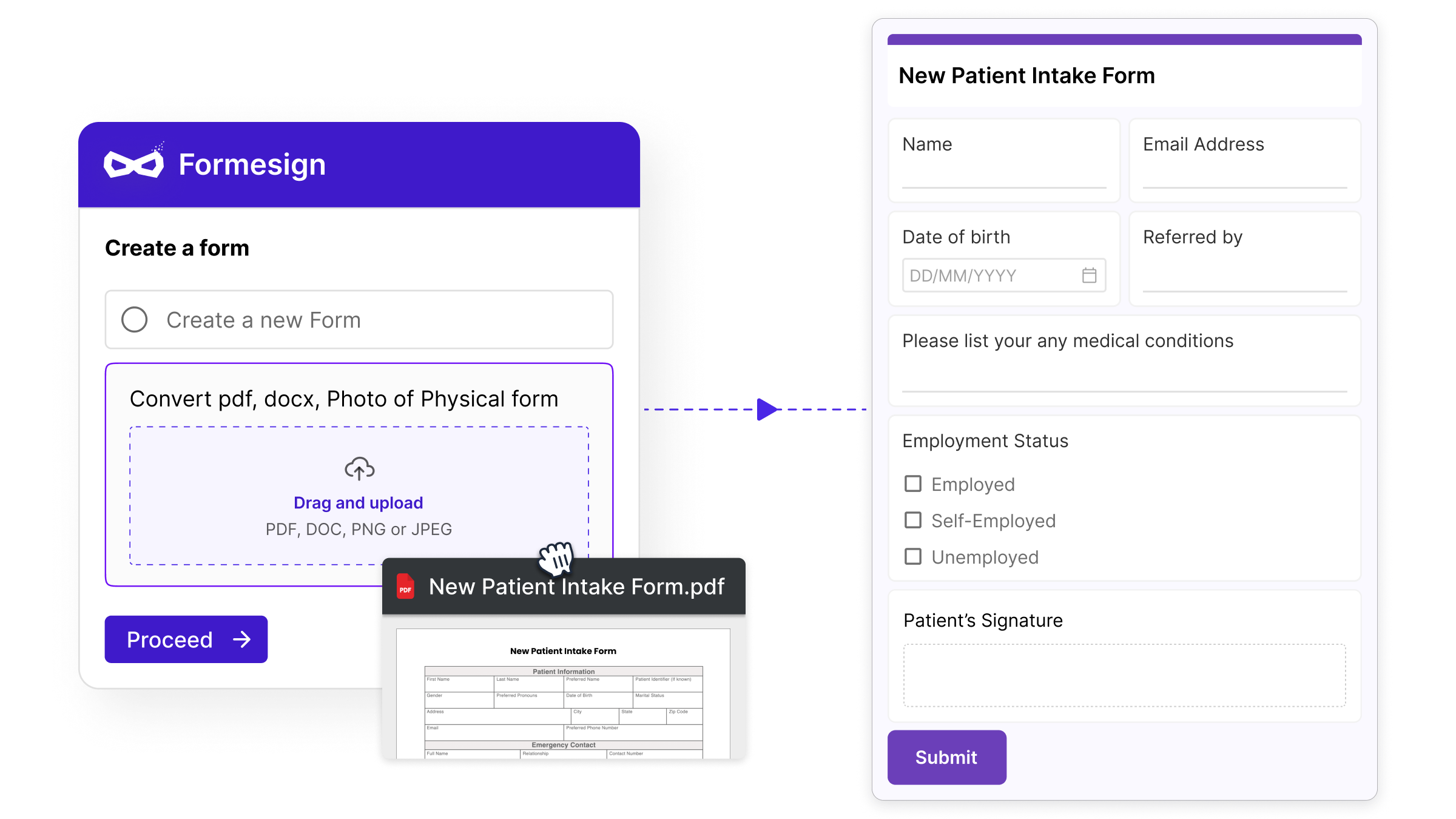
This approach preserves the PDF file format that organizations value, while improving the user experience:
- The stored file is still a PDF
- Layout and legality are preserved
- Anyone can open it
- It integrates seamlessly with existing document systems
But the UX is different:
- Mobile-responsive inputs
- Native validation and field types
- Clear progress indicators
- Conditional logic
- Faster completion
In other words, the PDF defines your record, not your user's experience.
The Isometric Design Philosophy
This move from paper based layout to responsive layout is what we call as skeuomorphic to isometric design. In Skeuomorphic design (DocuSign, Adobe Sign, Google Docs fillables):
- Users fill the same PDF that's stored
- The interface mimics the output
- Experience is limited by layout
In Isometric design (Formesign and similar tools):
- Users fill a responsive form
- PDF is generated afterward
- Experience is optimized
- Layout fidelity is guaranteed in output, not input
Both preserve PDF, but differ on how it is presented to the user.
Using AI to fill forms
If PDF is the permanent file format and forms the data collection interface, the next frontier is to make forms disappear entirely. Imagine a patient emailing a clinic:
"I need an appointment next week. I'm attaching my lab results and insurance card. I had knee surgery last year and take blood pressure medication."
AI reads the message and attachments, extracts key details, maps them to the clinic's intake structure, identifies what's missing and replies:
"Thanks! Just to confirm, is your emergency contact still John Smith?"
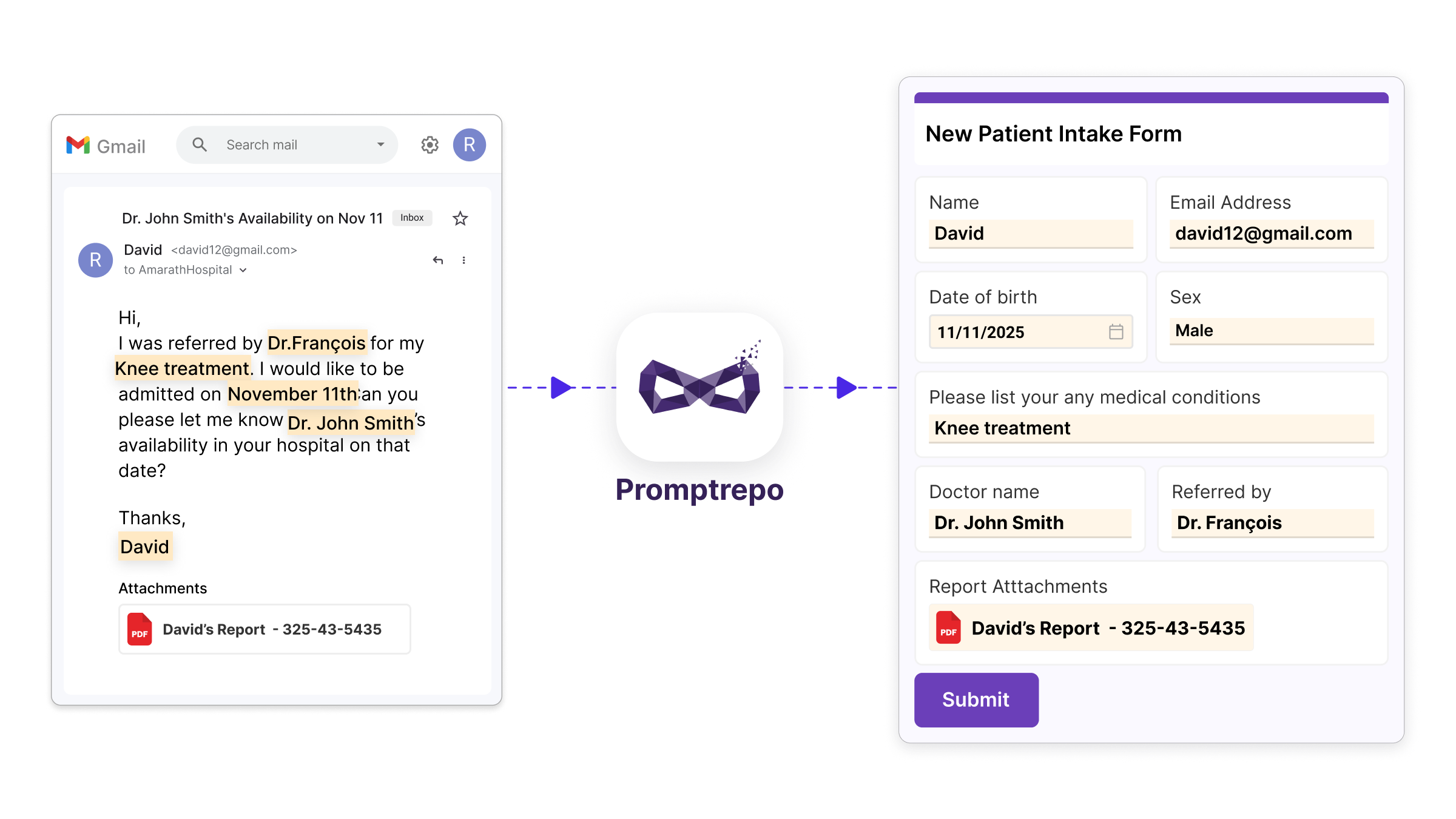
Once confirmed, the system generates the same standardized PDF the clinic expects. The patient doesn't have to fill a 4-page form; the clinic still receives a complete, compliant file. That's what we're building with Semantic Email. Email becomes the interface. AI handles the structure. PDF remains the trusted record.
Practical Takeaways for Organizations
- Separate collection from storage. Your PDF defines the record, not the input interface.
- Design for the devices users actually use. If 70% of responses come from mobile, optimize for mobile first.
- Treat PDF generation as plumbing, not design. Modern tools make compliant PDF generation easy. Don't let it dictate UX.
Conclusion
Printing PDFs defined the past. Fillable PDFs define the present. PDF templates and AI-driven input will define the future. The innovation opportunity isn't replacing PDF. It's building seamless, human-friendly experiences around it. Move toward natural channels like email, where AI handles structure, but always end with a legally sound PDF. Because disruption sounds cool in a pitch to investors. But for customers, continuity is what truly matters.
Summary
If your stored copy has to look exactly like what was signed, you do not have to make people fill in a PDF on a phone. With Formesign, your PDF is the template, people fill in a form on any device and you still get the same PDF. To see it, create your form from your PDF.
Last updated: