How to add a question to Google Forms?
This is a common question from people building their first form in Google Forms. Each question needs the right answer type: a short answer for a name, multiple choice for one option, a date for a booking. With the wrong type, people can type anything and your responses are harder to read and count later. Google Forms lets you add a question and pick its type, but the form your users see still looks like Google's. With Formfacade, you click on + and choose the required question type. Even better, the form will have your own branding instead of Google's, so people see your business and not a Google page. The responses will be collected on your Google Forms.
Let's start. Create your form and follow the steps below.
Add a question
- On the page that opens, name your form, click Embed form and click Proceed. It can take about a minute.
- You will land on the form's "Share" tab, on Embed. The top bar may say "Blank Formfacade form" until you reload the page.
- Click on "Edit" tab

- Click on the + icon in the toolbar on the right. A new Short answer question will be added
- Enter the question title
- Choose the required question type
- If required, enable Required toggle button to make this a mandatory question
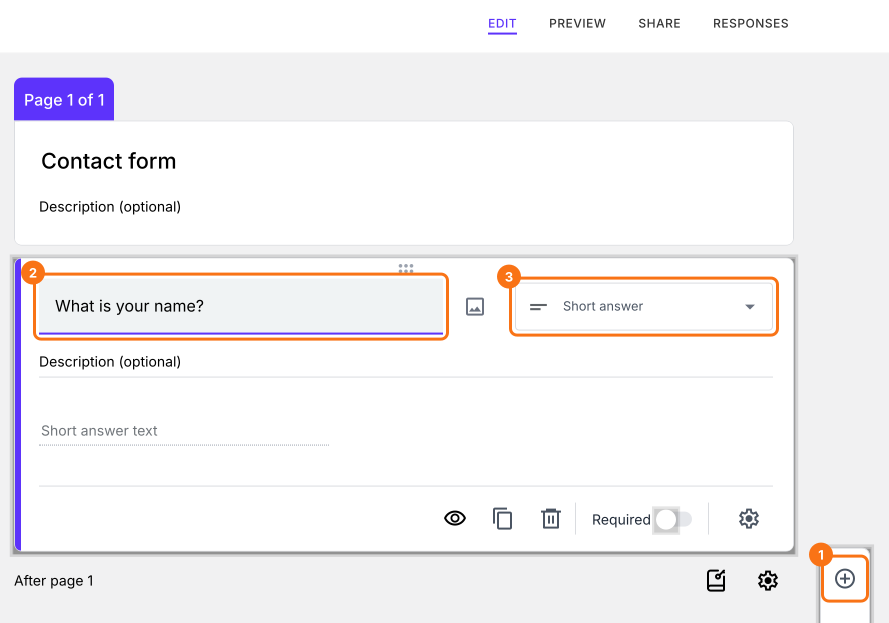
The new question will show on your form.
The supported question types are Short answer, Paragraph, Multiple choice, Checkboxes, Dropdown, File upload, Linear scale, Multiple choice grid, Checkbox grid, Rating, Date, Time, Signature and Drawing.
How to use each question type?
Summary
If a question has the wrong type, your responses are harder to read and count. With Formfacade, you click on the + icon, enter the question title and choose the required question type. Create your form and complete the steps above.
Last updated: