Formfacade form redirects to Google Forms page on submit. How can I fix this?
This is a common question from people who embed their form in their website. You want people to stay on your page when they submit it. With some Google Forms settings on, they are sent to the Google Forms page instead, sometimes with an error message. It looks broken to your visitors and you may not know which setting caused it. To fix it, turn off the two settings below in your Google Form.
How to open your form in Google Forms?
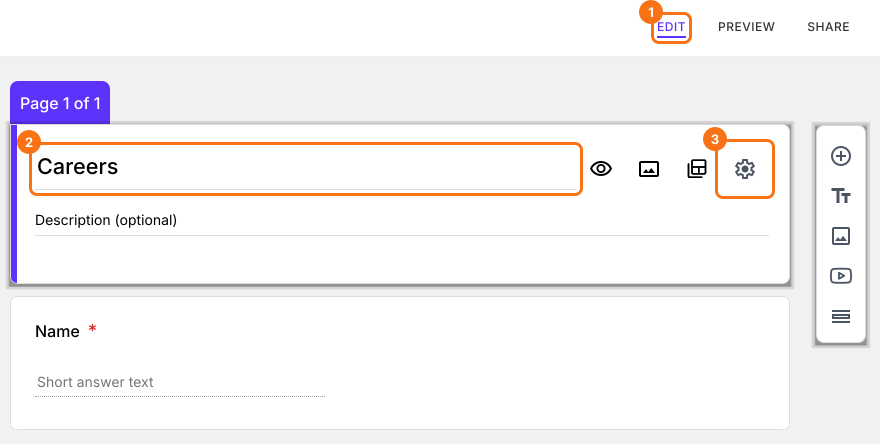
- Open your form in Formfacade and click on "Edit" tab
- Click on the form's title
- Click on the ⚙️ icon on the title card
- Click on the Advanced tab
- Click Launch next to "Edit this form with Google Forms"
- Your form will open in Google Forms in a new tab
Redirects to Google Forms page with the message "There was a problem submitting your response."
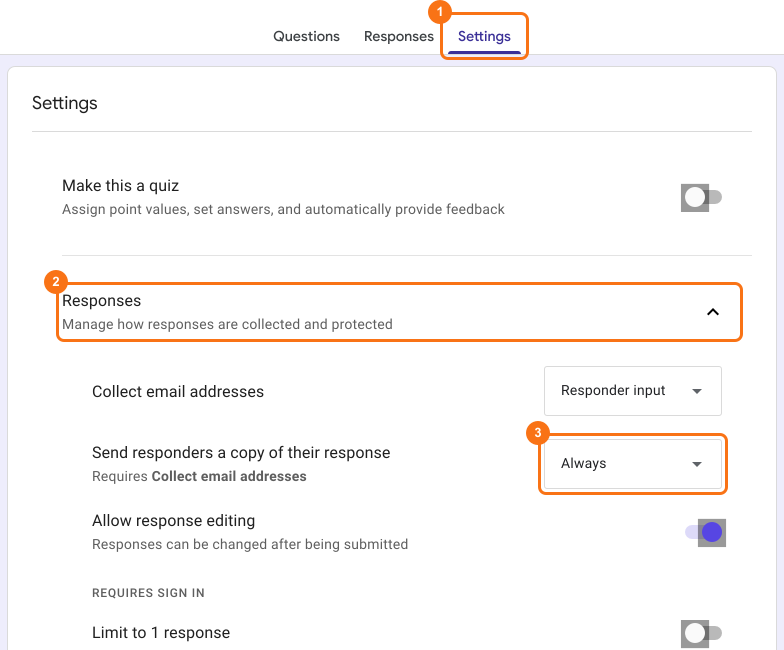
If you have enabled "Send responders a copy of their response" for all form submissions (Always), then the Formfacade form redirects to Google Forms page with the error message "There was a problem submitting your response. Try again."
To fix this, click on the Settings tab. Settings screen will be displayed. Click on Responses and change "Send responders a copy of their response" to Off.
How to send response receipts?
You can send them from Formfacade instead. Click on "Responses" tab, click Kanban board, click the ⋮ icon on Submitted and click Notify respondent or Notify collaborators. Please refer to the help articles:
Redirects to Google Forms page with the message "To fill out this form, you must be signed in."
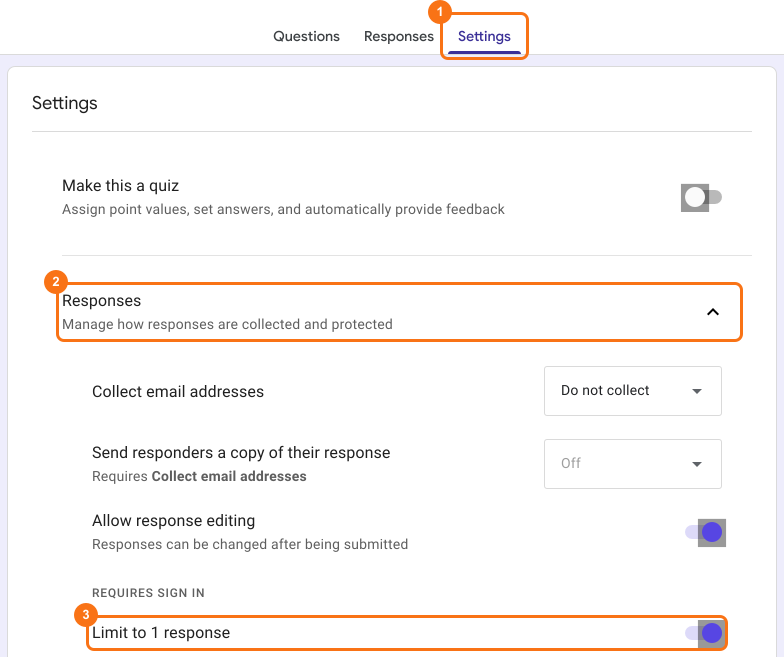
If you have limited the form submissions to 1 response per user, then the Formfacade form redirects to Google Forms page with the message "Sign in to continue. To fill out this form, you must be signed in." If the user has already signed in with their gmail account in their browser, it simply redirects to Google Forms page without any message.
To fix this, click on the Settings tab. Settings screen will be displayed. Click on Responses and turn off "Limit to 1 response".
Summary
If the form sends people to the Google Forms page on submit, a setting in your Google Form is the reason. You turn off these two settings in the Settings tab of your Google Form and you can send response receipts from the Responses tab in Formfacade. If you have any questions, write to support.
Last updated: