How to embed and customize Google Forms in React or Next.js without an iframe?
This is a common question from developers who build their product in React or Next.js. You want your form to use your own fonts, colors and dark mode. Google's embed code gives you an iframe from docs.google.com, so your CSS never reaches the form. Its Customize theme option stops at the header image, text style and colors and the Google Forms API has no styling at all, so the form always looks like Google. With Formfacade, you render the form as native HTML you can theme and embed with an npm package. Your users will see a form that looks like the rest of your product. Even better, the responses are still collected on your Google Forms, so your team can keep working from Google Forms and Google Sheets.
The default Google Forms embed is an iframe served from docs.google.com, so your stylesheet never reaches the form and it always looks like Google, not your product. This guide explains why that limitation exists, compares the real options, then shows how to customize your Google Form with Formfacade and embed it in React or Next.js without an iframe, including dark mode.
Why you cannot style an embedded Google Form with CSS
When you paste the embed code from Google Forms, you get an iframe that loads the form from docs.google.com. Browsers enforce cross-origin restrictions: your page's CSS and JavaScript cannot reach inside a frame served from another domain. Your .dark-mode class and your font stack stop at the iframe boundary.
Google gives you one styling tool, the theme editor. Open your form and click Customize theme to set a header image, text style for headers and questions, a theme color and a background color.
What it cannot do:
Match your site's fonts (you pick from Google's short list)
Remove the card layout, the purple focus accents or the Google Forms footer
Follow your app's dark mode
Make the form full-width and responsive inside your layout
The Google Forms API does not help either. It reads form structure and response metadata, but it has no styling endpoints at all.
Options to customize Google Forms in a React or Next.js app
There are two real ways to do this. The first is free and native, the second is Formfacade.
Option 1: Native iframe plus the theme editor
Use Customize theme to get the colors close, then embed the iframe in your component.
Pros:
Free and official, nothing extra to maintain
Works everywhere an iframe works
Cons:
Styling stops at colors and header image; fonts, spacing and layout stay Google's
Fixed-height iframe, long forms scroll inside their own box
No dark mode sync with your app
Option 2: How to customize your Google Form with Formfacade
Formfacade extracts your form fields and lets you restyle them in a visual editor.
On the page that opens, name your form, click Embed form and click Proceed. It can take about a minute.
You will land on the form's "Share" tab, on Embed. The top bar may say "Blank Formfacade form" until you reload the page.
Click on "Preview" tab to see the rendered form.
Pick the Minimal or Colorful style and choose a theme such as Persian indigo.
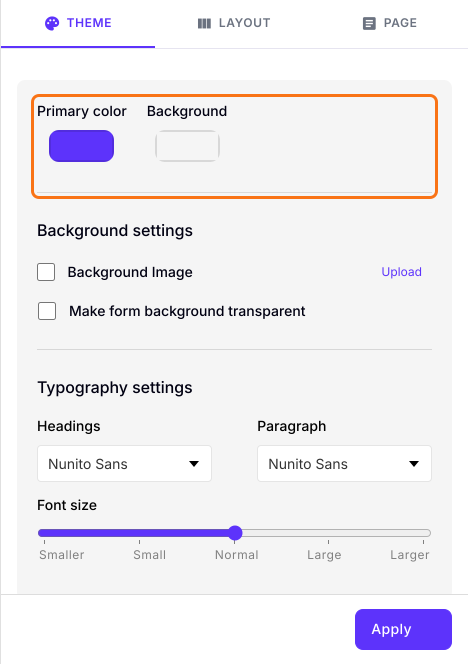
Adjust the primary color, background and typography to match your app.
This is a preview only. The design is kept only if you click "Apply to all forms", which restyles every live form on your account, so leave it if you have other live forms. The embed works without it.
How to embed the customized form in React or Next.js
The embed is a React component, not an iframe, so it inherits your page layout and stays responsive.
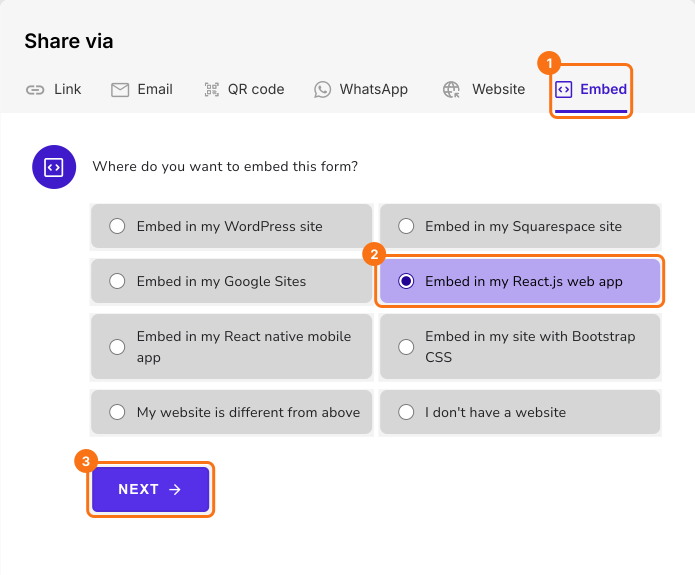
Click on "Share" tab
Click Embed
Click "Embed in my React.js web app" and click Next.
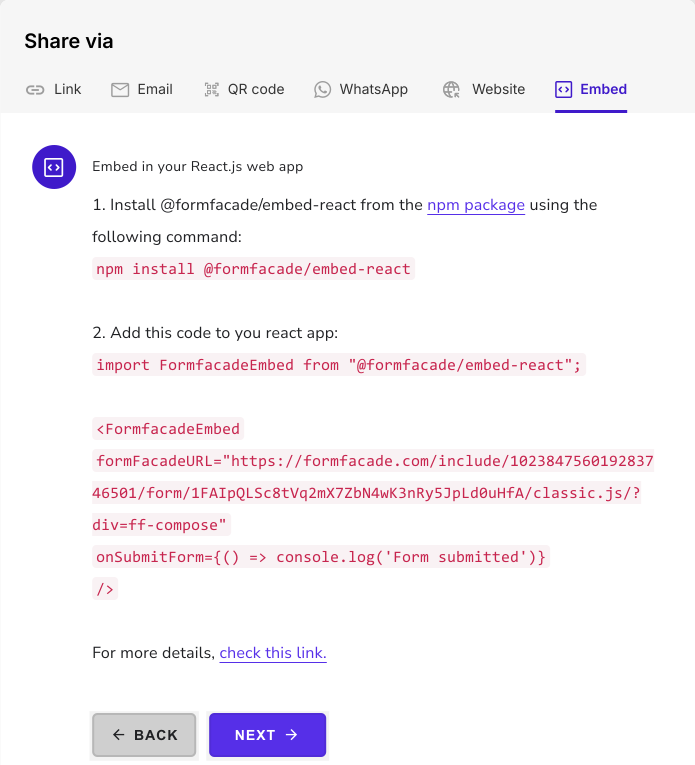
Copy the npm install command and the React component snippet.
Run npm install @formfacade/embed-react in your project.
Replace your iframe block with the Formfacade embed component. The code already has your form's URL.
Your form will show in your React or Next.js app without an iframe.
Where this setup works well
This approach fits any place where a visible Google iframe would look out of place: a waitlist signup on a marketing site or a feedback and contact form inside a Next.js app. You keep Google Forms as the backend your team already knows, while visitors see a form that matches your design, including dark mode.
Frequently Asked Questions
Does dark mode work with the embedded form?
Yes. Set your own background and primary colors on the Theme tab in Formfacade. Because the form renders as native HTML instead of an iframe, it sits inside your dark layout without a white Google card.
Do responses still go to Google Sheets?
Yes, with Submit to Google Forms on under Responses. Formfacade submits to your Google Form, so responses appear in the form response tab and in the linked Google Sheet, the same as before.
Does it work with the Next.js App Router and server-side rendering?
Yes. The @formfacade/embed-react component runs in the browser, so in the App Router add the "use client" directive at the top of the file that renders it. The rest of your page can stay server-rendered.
Can I just use CSS on the standard Google Forms embed instead?
No. The standard embed is an iframe from docs.google.com and cross-origin restrictions stop your CSS from reaching inside it. The only native styling is the Customize theme editor, which covers colors, header image and a limited font list.
Summary
If you embed a Google Form in React or Next.js, the iframe stops your CSS and the form always looks like Google. With Formfacade, you theme the form on the Preview tab and embed it with an npm package, with no iframe. Create your form and complete the steps above. If you have any questions, write to support.
