How to delete all responses from google forms?
This is a common question from Google Forms users who test their form before sharing it. For example, your test answers stay in your responses and in your summary charts and you do not want to count them with the real ones. Google Forms lets you delete all the responses from the More menu on its Responses tab, but the option is easy to miss and it cannot be undone. With Formfacade, you can open your responses in Google Forms from the Responses tab and delete all of them at once. Your charts will start clean for the real answers. Even better, the people filling your form will see your own branding instead of Google's and their answers will be collected on your Google Forms.
Let's start. Create your form and follow the steps below.
How to get your responses into Google Forms?
- On the page that opens, name your form, click Embed form and click Proceed. It can take about a minute.
- You will land on the form's "Share" tab, on Embed. The top bar may say "Blank Formfacade form" until you reload the page.
- Click on "Responses" tab

- Click Submit to Google Forms
- "Submit responses to Google Forms?" popup will be displayed. Click Proceed

- Click on "Share" tab

- Click Link, then click Open to open your form
- Fill the form and submit it, so that you have a response to see
How to delete all the responses?
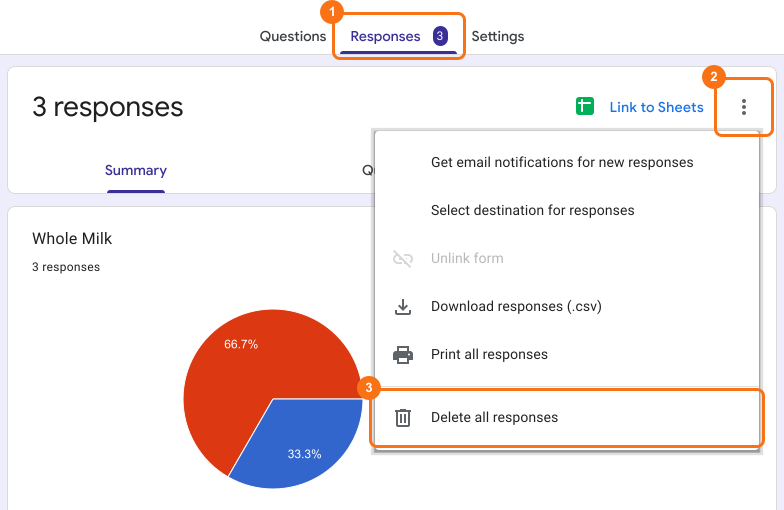
- Click on "Responses" tab
- Click View in Google Forms. Your form's responses will open in Google Forms

- Click More ⋮ icon
- Click Delete all responses
- Click OK to delete all the form responses.
⚠️ Important
- Google Forms does not have version history like Google Docs or Sheets. When you delete responses in Google Forms, it will be deleted permanently. Deleted responses cannot be restored later.
- Deleting responses from Google Forms will not automatically delete the responses synced to Google Sheets. You can manually delete it in sheets or unlink the form & create a new sheet.
Summary
Last updated: